DemoPage vs Storylane
An AI agent that presents captured demos, or one that runs your product.
Storylane captures screenshots and HTML copies of your app into interactive demos and sandboxes, and its RepX agent talks with visitors by text, voice, or video, answers questions, and presents those demos. DemoPage opens your real product in a sandboxed browser, walks the screens each buyer asks about, and answers only from pages you approved, with links.
Here, Storylane means Storylane's interactive demos, sandboxes, and RepX AI agent. Features differ from tool to tool; this compares the approach.
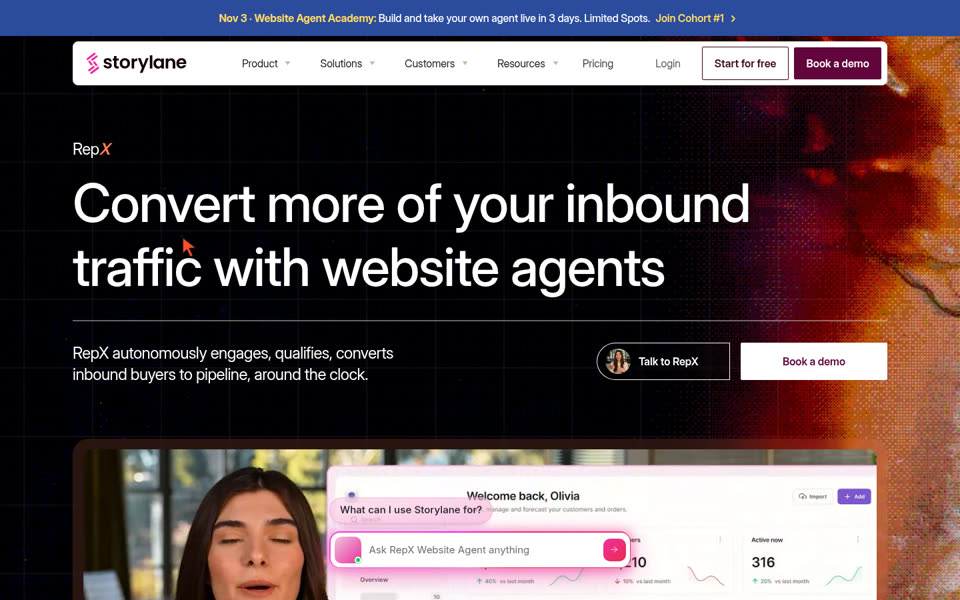
Storylane captures screenshot/HTML flows and presents them with its RepX agent.

DemoPage opens your real product in an isolated cloud browser, walks the screens that match the buyer's ask, and cites the approved page on every answer.
DemoPage vs Storylane: side by side
| Question | Storylane | DemoPage |
|---|---|---|
| What the buyer sees | Captured screenshot or HTML and CSS demos and sandboxes | Your real product running live in a sandboxed browser, plus an instant recorded walkthrough |
| AI during the visit | RepX answers questions, presents demos, qualifies, and books meetings by text, voice, or video | Plans the route from what the buyer asked, drives your real app, narrates it, and answers with a link to each source |
| What it can show | The demos, slides, videos, and links your team prepared | Any approved page of your live site, docs, or sandbox |
| Editing what's on screen | Edit text and data in the captured HTML | No editing: buyers see your real screens, with secrets masked |
| Personalization | Dynamic tokens per account or persona | Route and narration planned from each buyer's goal and the tools they use |
| How you build it | Capture with the Chrome extension, desktop app, or Figma plugin | Approve URLs, or map them from your code with DemoPage's MCP server, on every plan |
| Demos before the first call | Share a personalized demo or a Hub (deal room) | Growth and Scale: your CRM sends a new lead and DemoPage records a demo for them before the first call |
| What sales gets afterwards | Demo Signals intent scoring and HubSpot or Salesforce deal intelligence | The lead and what they saw and asked; Growth adds lead notes in the buyer's own words and a shareable recap link |
An agent that presents captured demos vs. one that drives your product
RepX can hold a real conversation with a visitor and show the interactive demos, slides, and videos your team prepared. What it shows of your product is the captured version.
DemoPage's AI works on your live product. The visitor types or speaks what they want to solve; DemoPage picks the matching pages from your approved catalog, opens them in a sandboxed browser, narrates them in the buyer's language, and answers questions with a link to the page each answer came from.
Edited screens vs. real screens
Storylane lets you edit the text and data in captured HTML, so a demo can show numbers or names that aren't in your sandbox.
DemoPage shows only what's really there. It masks secrets before frames leave the browser and blocks saves, payments, invites, and deletes, so a buyer can click around the real product safely.
What happens when your product UI changes
A demo built from captured screens shows your product as it was when someone captured it. A navigation redesign or a renamed menu means going back to recapture the changed steps.
DemoPage opens your live site or sandbox on each run, so the next demo shows the current product. Every night it loads each approved page in a headless browser, checks that its expected text is still there, and holds back any page that changed before a buyer sees it.
Lead handoff and demos before the first call
After a DemoPage demo, your team gets an email with who watched, what they saw, and what they asked. Starter adds Slack, webhooks, and Zapier.
On Growth and Scale, alerts also carry lead notes in the buyer's own words, the buyer gets a 30-day recap link to forward to their team, and your HubSpot, Salesforce, or Zapier workflow can have DemoPage record a demo for each new lead before the first call.
Pick Storylane when
- ·You want to edit on-screen numbers or text that don't exist in your sandbox
- ·You need many short demos embedded across blog posts and launch pages
- ·You want one AI agent that presents slides, videos, and demos and books the meeting
Pick DemoPage when
- ✓You want buyers to see your real product, not a captured copy
- ✓You ship UI changes often and don't want to recapture demos
- ✓You want every answer tied to a page you approved, with a link the buyer can check
- ✓You want to pay per live demo instead of per seat
You can use both: Storylane demos inside launch posts and landing pages, and DemoPage behind your main demo button and for demos before the first call.
Questions
Frequently asked questions about Storylane.
How is DemoPage different from Storylane?
+
Storylane's demos are captured copies of your app, and its RepX agent presents them in conversation. DemoPage runs your actual software in a sandboxed browser, walks the screens each visitor asks about, and answers only from pages you approved, with links.
Does Storylane have an AI agent?
+
Yes. As of October 2026, Storylane's RepX engages website visitors over text, voice, or video, answers product questions, presents demos, qualifies leads, and books meetings.
Which needs less upkeep when our product UI changes?
+
DemoPage runs against your real product or sandbox rather than saved page copies, so a restyle needs no recapture. If an approved page moves or stops showing its expected text, the nightly readiness check holds it back and tells you.
Can DemoPage personalize demos for inbound leads automatically?
+
Yes. Every visitor on your website gets a walkthrough planned around what they ask for. On Growth ($799 a month) and above, your HubSpot, Salesforce, or Zapier workflow can also have DemoPage record a demo for each new lead before the first call.
Can we edit text on screen in DemoPage like in Storylane?
+
No. By design, DemoPage shows your real product rather than an edited copy, and its token guard masks sensitive strings automatically. If you need on-screen text that doesn't exist in your sandbox, an HTML editor like Storylane's is the better choice.
What does DemoPage cost?
+
DemoPage charges for counted live demos, never per seat: a live demo counts when a visitor stays three minutes or finishes, once per visitor per day. Free gives 10 live demos in your first 30 days, then 3 a month; Starter is $99 a month for 10, and Growth $799 a month for 100. Recordings and chat don't count.
Try it on your own product
See how a live product demo feels—in minutes, with no card.
Sign up with your work email for 10 free live demos in your first 30 days, test our live showcase room right now, or have our free tool email you a narrated walkthrough of your public website.
Related comparisons