Short answer
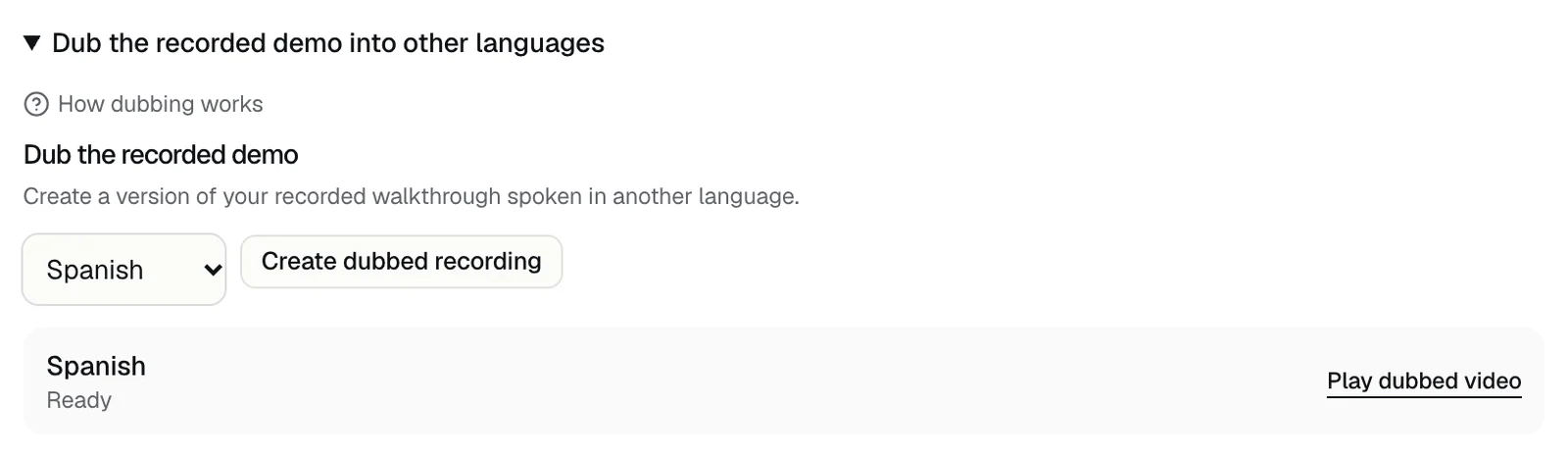
Yes. In Demo settings, open Dub the recorded demo into other languages, choose a language, and press Create dubbed recording. Once it says Ready, visitors who watch the recording in that language get the dubbed version instead of the original.
Steps
- 1Open the Demo settings tab, then open Dub the recorded demo into other languages.
- 2Choose a language: Spanish, French, German, Hindi, Italian, Portuguese, Chinese, Japanese, Korean, Russian, or English.
- 3Press Create dubbed recording. The list under it shows the dub's progress.
- 4Keep the tab open until it says Ready, then press Play dubbed video to watch it.
A dub reaches visitors once the portal shows Ready. If you leave before then, open Demo settings again later, and it finishes there.
What it needs
- A finished recording of your demo. Without one, it says Record a finished demo before dubbing it.
- A recording made in English, Spanish, French, German, Hindi, Italian, or Portuguese. A recording in another language can't be dubbed.
- A language other than the recording's. Choosing the same one says Choose a language different from the recording.
- Create dubbed recording works three times in any 24 hours. After that, it says Three dubbing jobs have already been started today. Try again tomorrow.
- Dubbing doesn't use your live demos.
What visitors see
- A visitor whose demo is in a dubbed language gets the dub when they watch the recording. Everyone else gets the original.
- Live demos don't use dubs: the guide already speaks the visitor's language.
- Each language has one dub at a time.
When the recording changes
The recording visitors watch can change when a newer demo of your product finishes. A dub only plays with the recording it was made from, so visitors then get the new recording in its own language. Which recording visitors see
To dub the new one, choose the language and press Create dubbed recording again; it replaces the old dub. If a dub was still being made when the recording changed, the list says The source recording changed. Start this language again.
To check a dub, press Play dubbed video. If it plays the original language, dub it again.
If something goes wrong
- Voice translation is temporarily unavailable: the dubbing service isn't answering, so Create dubbed recording is greyed out. Dubs you already made keep playing. Try again later.
- Create dubbed recording is greyed out with no message: dubbing isn't available for that language right now. Try again later.
- The list shows an error where Ready would be: that dub failed. Choose the language and press Create dubbed recording to start it again.
- Could not dub the recording: try again, and contact us if it keeps happening.
Related questions
Didn't answer your question?
Talk to us with your demo link and the email you signed up with, or write to hello@demopage.io. We'll answer, and add it to the Help Center.