Short answer
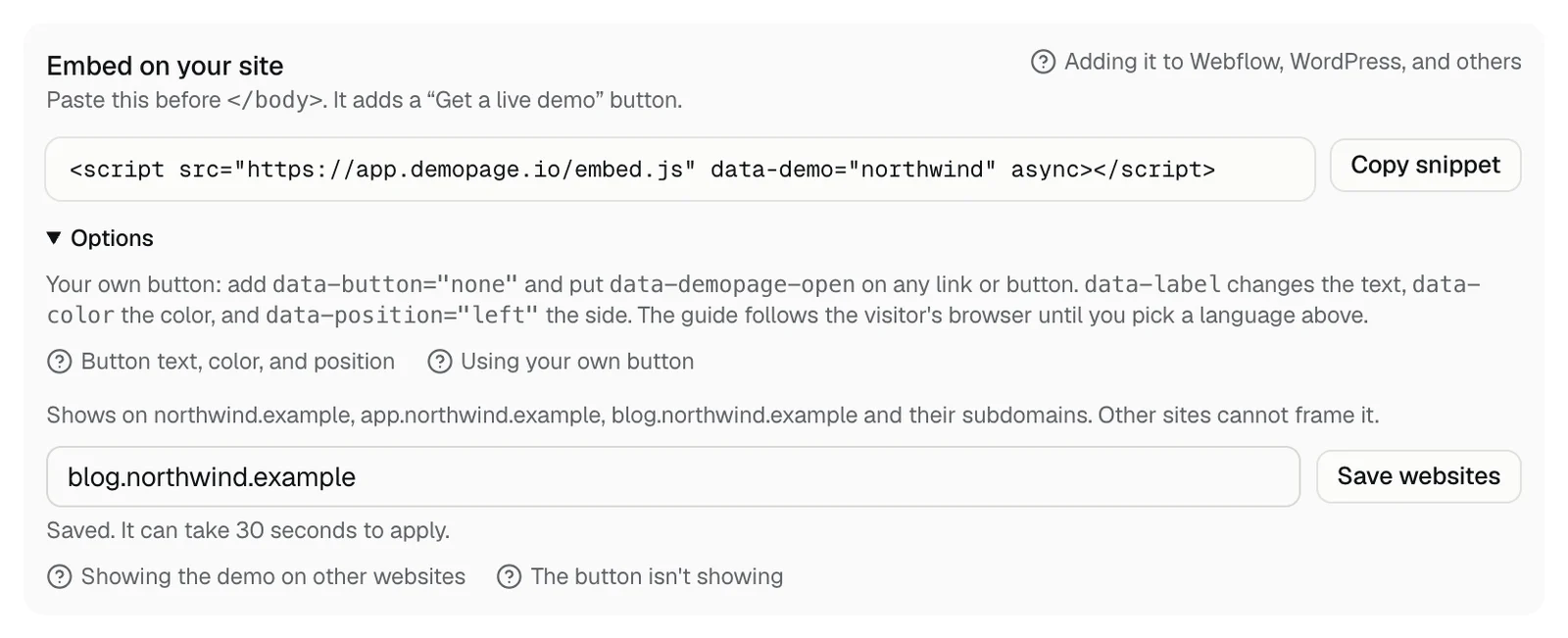
The demo opens on your website's domain and its subdomains by default. To show it on another site, such as a blog on a different domain or a staging site, add that site under Embed on your site in Demo settings and press Save websites.
Steps
- 1In your portal, open Demo settings and find Embed on your site. The line that starts with Shows on lists the sites that already work.
- 2In the field that says Other websites, type the other site, like blog.example.com. Separate several sites with commas.
- 3Press Save websites. The portal says Saved. It can take 30 seconds to apply. Then reload the other site.
What to type
- The site's address on its own. https:// and anything after the domain are dropped, so blog.example.com/posts saves as blog.example.com.
- Each site you add covers its subdomains too. Add your own staging address, like yoursite.webflow.io, not a shared host like webflow.io, which would let every site on it frame your demo.
- If you signed up with a subdomain website, like app.example.com, add your main domain too.
- Up to 10 sites. The field holds the whole list, so keep the sites already in it when you add one.
- If a site isn't a valid address, the portal says it's not a website address like example.com. Fix it and save again.
On a site that isn't listed
The DemoPage button still appears, but the panel opens without the demo, because other sites can't frame it. Your demo link works anywhere, since it opens on DemoPage's own page. Sharing your demo link
Why other sites are blocked
Other sites can't frame your demo unless you list them. That keeps anyone from putting your demo on a site you don't control, or using up your live demos. How DemoPage keeps demos safe
Related questions
Didn't answer your question?
Talk to us with your demo link and the email you signed up with, or write to hello@demopage.io. We'll answer, and add it to the Help Center.