Short answer
Connect your coding tool to DemoPage's MCP server, sign in with your DemoPage account, and press Allow. The tool reads your code on your machine, maps your screens, and sends only a short description of each page for you to approve. Nothing is published until you approve it.
Connect your tool
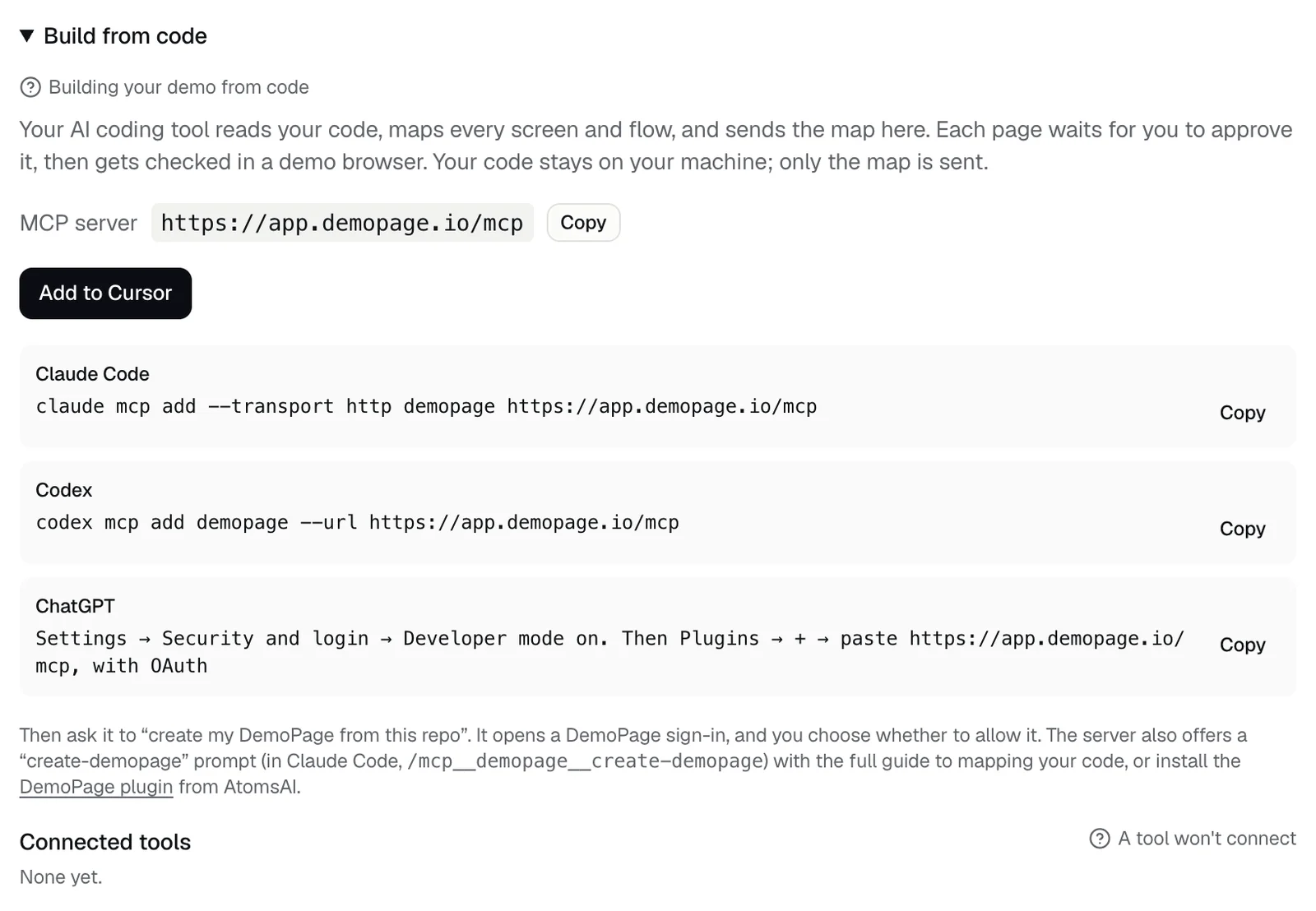
- Cursor: in Demo settings, under Build from code, press Add to Cursor.
- ChatGPT: press Open in ChatGPT (chatgpt.com/plugins/plugin_asdk_app_6aba597c59a08191921381206d16486f), or in Settings, under Security and login, turn on Developer mode and add the server under Plugins with OAuth. It can map your screens only from source files you attach to the conversation.
- Claude Code: run claude mcp add --transport http demopage https://app.demopage.io/mcp
- Codex: run codex mcp add demopage --url https://app.demopage.io/mcp
- Before you go live, Build from code isn't in the portal yet. Add https://app.demopage.io/mcp to your tool directly.
Then
- 1Ask your tool to create your DemoPage from this repo. In Claude Code, the server's create-demopage prompt, /mcp__demopage__create-demopage, has the full guide.
- 2Sign in with your DemoPage account, read what the tool will be able to do, and press Allow.
- 3Ask it to list the pages it sent, then approve the ones you want. Approving your first pages also turns your demo link on. If your sign-up email is on another domain, it turns on once we've checked that you run the site. Why isn't my demo live yet?
- 4Approved pages are checked in a demo browser, and any that fail stay out of demos. Pages kept out of demos
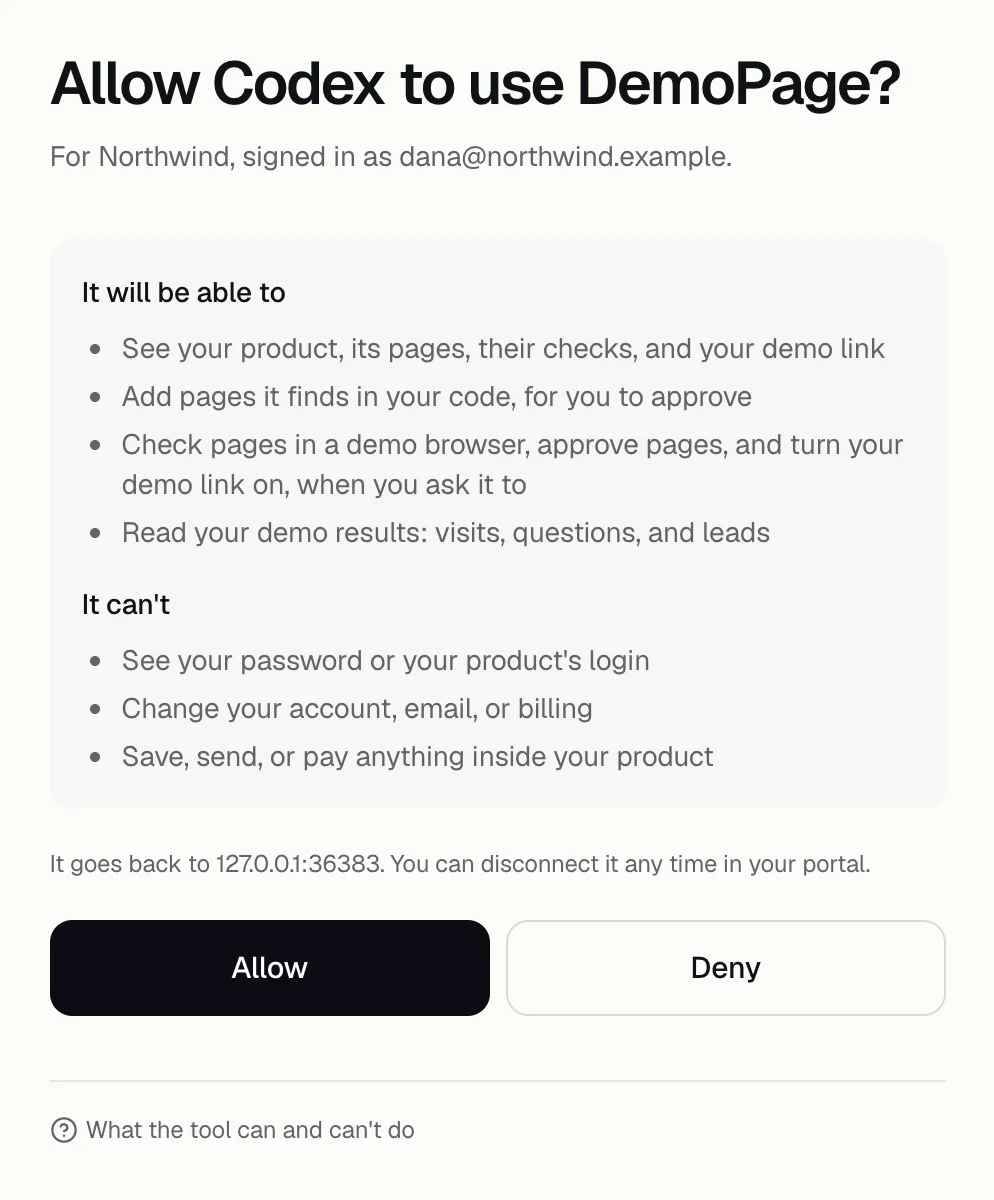
What the tool may and may not do
Under It will be able to, the sign-in page lists: see your product, its pages, their checks, and your demo link; add pages it finds in your code for you to approve; check and approve pages and turn your demo link on when you ask; and read your results. Under It can't: see your password or your product's login, change your account, email, or billing, or save, send, or pay anything inside your product.
What is sent
For each page: a title, its https address on your product's domain without a query string, a short text visible on the page, a sentence or two on what it does, whether it needs a sign-in, and optional keywords or a click path, plus a short note on where the map came from. Your code stays on your machine; only the map is sent. The connection can't read your repository; your tool reads it locally.
Limits
- Up to 100 pages per send, 30 sends an hour, and 400 mapped pages in all.
- Addresses with credentials, query strings, or fragments are refused, and so are checkout, billing, keys, and account security pages.
- A page already in your list is skipped unless something about it changed. A changed page waits for your approval again.
Disconnect a tool
Press Disconnect next to it under Connected tools. A connection also ends after 30 days without use, and resetting your password disconnects every tool.
The DemoPage plugin
The DemoPage plugin, linked under Build from code, packages the same guide for Cursor, Claude Code, and Codex.
Related questions
Didn't answer your question?
Talk to us with your demo link and the email you signed up with, or write to hello@demopage.io. We'll answer, and add it to the Help Center.