Short answer
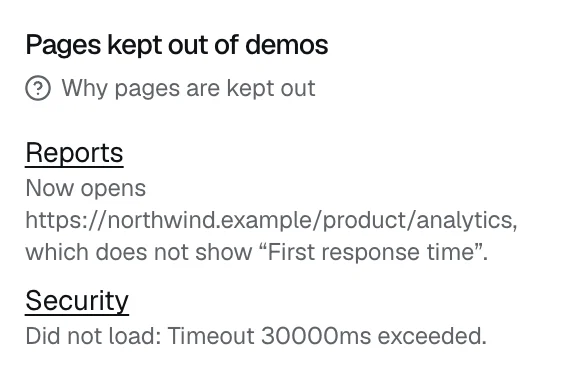
DemoPage loads every approved page the way a demo would when you go live, when you save signed-in pages, and again each night. A page that fails twice in one check is kept out of demos until a later check passes, and the Results tab lists it under Pages kept out of demos with the reason.
What to do
- 1Open the Results tab and find Pages kept out of demos. Each row links the page and says why, such as Did not load, or Left the allowed domains for an address outside your site.
- 2Open the page yourself and look for a redirect, an error, a login wall, or a cookie banner covering the content.
- 3Fix the page, and a later nightly check lets it back in once it loads. To check sooner, open Demo settings, start an update under Update the live demo, press Check selected pages, and publish once every page passes; see How do I change the pages after my demo is live?
- 4An update loads website pages only. To check a signed-in page sooner, open Signed-in product pages under Demo settings and press the Show N pages in demos button; see How do I show my product's signed-in screens?
What the check fixes by itself
- A page that moved is followed to its new address.
- If the line the guide quotes from a page is gone, the check uses the page's heading instead.
While a page is kept out
- The guide doesn't open it on screen, but it can still answer from what the page says.
- If every page of its own fails at once, none of them is kept out.
- When nothing is kept out, the section says Every checked page loads in demos.
Alerts
When the nightly check keeps out a page that was working before, your alert emails get a message saying how many pages were kept out of your demos last night. It lists up to 10 of them with the reasons and links to your results. If you've connected Slack, it's posted there too.
Alert emails start as your sign-up address. Change them under Where alerts go on the Leads tab; see Where do my demo leads go? To stop alerts for a while, see How do I stop lead alerts for a while?
Related questions
Didn't answer your question?
Talk to us with your demo link and the email you signed up with, or write to hello@demopage.io. We'll answer, and add it to the Help Center.